

SELL TICKETS FROM YOUR WEBSITE
OPTIMIZED POP-UP CHECKOUT
Sell tickets directly from your website with our optimized pop-up checkout. Add the Billetto widget to any page and attendees complete their purchase in a seamless overlay, without ever leaving your site. Match it to your brand with light or dark themes and custom button colors, and it looks great on desktop, tablet, or mobile.
DESIGNED TO FIT YOUR SITE
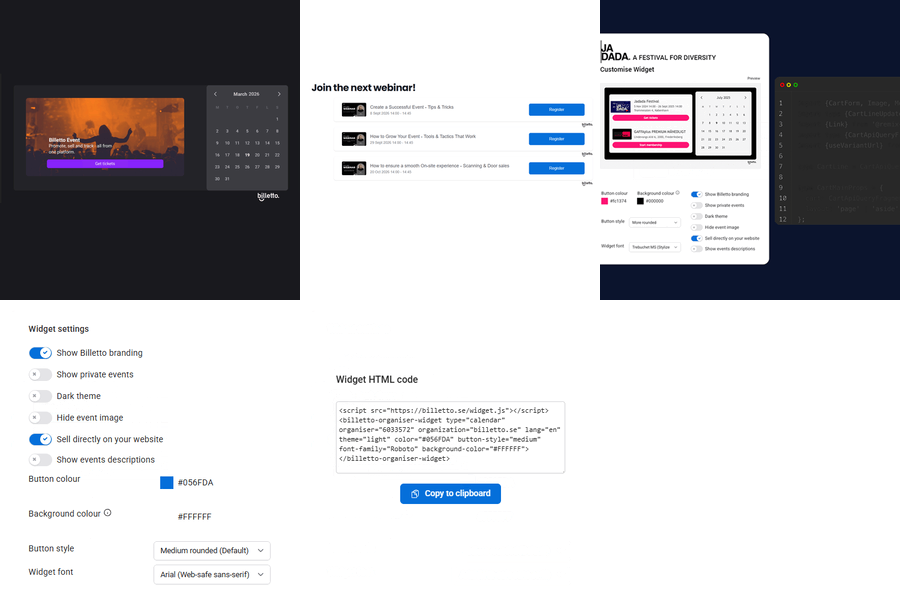
The ticket widget comes with simple adjustments and options to fit your website design. Change the colors of the controls, select how much information you want to display and control your payment methods. Customize every detail to match your brand identity.

What features does the Billetto ticket widget include
- Keep buyers on your website — the widget opens a seamless Billetto checkout pop-up so customers complete their purchase without ever leaving your page
- Four widget styles to fit any use case — a single button, a single-event widget, a recurring-event calendar picker, or a full account widget showing your entire event portfolio as a calendar, list, or button grid
- Fully responsive design — optimized for mobile, tablet, and desktop, with high-resolution display support for crisp visuals on every screen
- Customizable branding — match your site's colors and fonts with light/dark themes, hex-code button colors, the option to hide event banners, and the ability to remove Billetto branding entirely
- Cross-browser compatibility — works flawlessly on Chrome, Firefox, Safari, Edge, and Opera
- Multi-language support — customize the checkout language to match your audience across markets
- Flexible configuration — choose exactly which event information to display, which payment methods to accept, and whether to include private events
- Easy platform integration — works with WordPress.org, Squarespace, and Wix out of the box
- Quick setup — comprehensive step-by-step documentation and a dedicated support team ready to help with integration questions
- Find your embed code in seconds — grab your personalized widget code straight from the Marketing > Widget section of your event dashboard
Selling tickets at Billetto
Turn your website into a ticket shop
You don't need to send visitors away to sell tickets. With Billetto's widgets, you can embed your events directly into your own website — so people can browse, choose, and buy without ever leaving your page. No coding required, no redirects, no lost sales. Just copy a snippet of code and you're live in minutes. There are two widgets to choose from, depending on what you're promoting.
Account Widget — showcase your whole event lineup
If you run multiple events, the Account Widget puts your entire calendar on display. Embed it once on your homepage or events page, and it automatically updates every time you add a new event — as a calendar, list, or simple button. It's the easiest way to turn your website into a living, always-current events hub, without touching the code again after setup.
Event Widget — sell tickets to one specific event
Promoting a single show, class, or one-off event? The Event Widget lets you drop a dedicated ticket-buying experience straight onto that event's page — with its own design, colors, and checkout, matched to your brand. You'll find it inside "Manage event," so it's ready the moment you publish. Perfect for landing pages, campaign pages, or anywhere you want a focused, single-purpose call to action: buy tickets, now.
Why it's worth setting up
Every widget is fully customizable — light or dark themes, your own button colors and fonts, and the choice to keep or hide Billetto branding. They work on WordPress, Squarespace, and Wix out of the box, look great on any device, and keep your buyers checking out on your site instead of bouncing to someone else's. Set it up once, and every event you create from that point on sells itself, right where your audience already is.
Denmark